Introduction
If you searched for “Hot IPTV,” you probably landed on a mix of apps, forums, and sites selling subscriptions, and it is hard to tell what is real. This guide explains what Hot IPTV actually refers to, how Hot Player works, how to set it up, and how to avoid the lookalike sites that cause most of the confusion.
Key Takeaways
- “Hot IPTV” most often refers to Hot Player, a media player app.
- Hot Player includes no channels or content. You supply your own playlist.
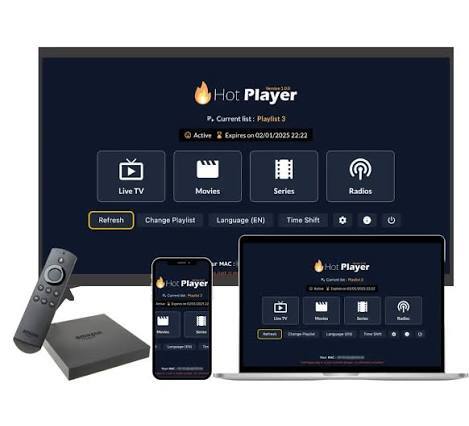
- It is available on Samsung, LG, Android TV, Fire TV, Roku, Windows, Apple, and other platforms.
- The official site warns that unauthorized websites copy its branding to sell IPTV packages.
- Use only playlists and content you have the legal right to watch.
What Is Hot IPTV?
IPTV stands for Internet Protocol Television, which means TV delivered over the internet instead of cable or satellite. “Hot IPTV” is not a single company or service. In most searches, people are looking for Hot Player, an app that plays playlists on your TV, phone, or computer.
The official Hot Player website describes the product as a media player with no channels included and says the developers are not responsible for content that users upload. It also states that the company does not sell IPTV subscriptions or channel packages and has no connection with third-party providers.
A good comparison is VLC or a podcast app. The app plays what you load into it, but it does not supply the content itself.
Hot Player vs. an IPTV Provider
Many people mix these up, and that is how they end up paying the wrong party.
| Hot Player | IPTV provider | |
| What it is | A media player app | A service that supplies channels or VOD |
| Includes channels | No | Yes |
| What you pay for | App activation | A content subscription |
| What you need | Your own playlist | An account with the provider |
| Legality depends on | The content you load | The provider’s licensing |
Hot Player Features
The official site lists these features:
- Simple interface that is easy to use on a remote
- Favorites list to save preferred channels
- Channel navigation by number with your remote
- Search by keyword for channels, movies, or series
- Sorting alphabetically, A-Z or Z-A
- Parental controls to lock or hide content with a PIN
- Multi-list support for up to three playlists, with easy switching
- Lock MAC to stop others from resetting your playlist
For US households, the parental controls and multi-list support are useful when different family members have different playlists, such as a family list and a separate one for personal media.
Supported Devices
According to the official site, Hot Player is available on:
- Samsung (Tizen) TVs
- LG TVs
- Android TV and Google Play devices
- Amazon Fire TV and Fire Stick
- Roku
- VIDAA TV
- Windows (Microsoft Store)
- iPhone and iPad (App Store)
- Whale TV and Titan OS
Availability can vary by region and device model, so search your device’s official app store to confirm it appears for you.
How to Set Up Hot Player
The process below follows the structure the official site shows: install, activate, upload your list.
Step 1: Install the app
Open your TV or device’s official app store and search for “Hot Player.” Install it only from the official store. Avoid sideloaded files from unknown websites.
Step 2: Find your MAC address
When you open the app, it displays your device’s MAC address on screen. Note it down exactly. Your playlist and activation are tied to this address.
Step 3: Activate your device
Go to the official Hot Player site and open the Activation page. Enter your MAC address and choose a plan. The site advertises a free 30-day trial, followed by paid options.
Step 4: Upload your playlist
On the Upload List page, enter your MAC address and add your M3U playlist link or file. You can add up to three lists.
Step 5: Restart the app
Close and reopen Hot Player, or restart your device. Your playlist should load. If the list does not work, the app warns you with a message on screen.
Step 6: Lock your MAC address
In the app settings, turn on Lock MAC. This helps prevent someone else from resetting your playlist, which matters if you ever shared your MAC address with a third party.
How Much Does Hot Player Cost?
The official site advertises a free 30-day trial, then a yearly plan or a one-time “Forever” plan, priced in Moroccan dirhams with approximate euro equivalents. The site’s own pricing and FAQ sections show slightly different figures, so check the current amount on the Activation page in your own currency before you pay.
[VERIFY before publishing: current US pricing and trial terms]
The key point is that the fee is for the app, per device. It is not a payment for channels.
Where Can You Get a Playlist?
Because Hot Player ships empty, you need to provide your own playlist. Legitimate options include:
- An M3U link supplied by a licensed TV service that offers one
- Free, legal channel playlists published by broadcasters or public streams
- A playlist of your own media files or recordings
- Playlists from a provider you have verified as properly licensed
Be careful with sellers who promise thousands of premium channels, every sports package, and movies for a few dollars. Pricing like that usually points to unlicensed content. Those services can disappear without notice, and you may lose your payment.
How to Avoid Hot Player Scams and Copycat Sites
The official Hot Player site includes a disclaimer saying it has found unauthorized websites copying its platform and using its name and content to sell IPTV subscriptions. It says it does not endorse or recognize transactions made through those sites.
To protect yourself:
- Activate only on the official domain, hotplayer.app.
- Never pay anyone for “Hot Player channels.” The app has none.
- Do not send card details through chat apps like WhatsApp or Telegram.
- Download only from official app stores.
- Check the URL carefully. Lookalike domains often add extra words or swap letters.
- Use a card or payment method with buyer protection.
- Do not reuse passwords on any IPTV-related site.
Troubleshooting Common Problems
My playlist won’t load. Check that the M3U link is correct and active, and that you entered the right MAC address when uploading it.
The app says my list is invalid. The link may be expired or broken. Ask the source for a new link.
My playlist disappeared. If you shared your MAC address, someone may have replaced the list. Enable Lock MAC in settings and upload your list again.
Channels buffer or freeze. This is usually a problem with the playlist’s source or your connection, not the player. Test with another playlist to find out. For smooth HD streaming, aim for about 15-25 Mbps, and use Ethernet or 5 GHz Wi-Fi if you can.
I can’t find the app on my TV. Not every model supports every app. Check your TV’s operating system and update its firmware.
Tips for the Best Experience
- Use Ethernet when possible for more stable streaming.
- Keep your TV firmware and the app updated.
- Organize channels with the favorites list to avoid scrolling through huge lists.
- Use the PIN lock if children use the same TV.
- Keep a backup of your playlist link somewhere safe.
Frequently Asked Questions
What is Hot IPTV?
Hot IPTV usually refers to Hot Player, a media player app that plays playlists you supply. It is not a channel provider.
Is Hot Player legal?
The app is a neutral media player. Whether your viewing is legal depends on whether the playlist’s content is properly licensed.
Does Hot Player have channels?
No. The official site says no channels are included, so you must add your own playlist.
Is Hot Player free?
The site advertises a free 30-day trial, followed by a yearly or one-time activation fee per device. Confirm current pricing on the official site.
Can I use Hot Player on Firestick, Samsung, or LG?
Yes, these platforms are listed as supported.
Can I use more than one playlist?
Yes, you can upload up to three lists and switch between them.
How do I stop someone resetting my playlist?
Use the Lock MAC option in the app’s settings.
Is Hot Player the same as the sites selling Hot Player IPTV subscriptions?
No. The official site says those sites are not affiliated with it and that it does not sell IPTV subscriptions.
Conclusion
Hot IPTV is best understood as Hot Player: a flexible media player that gives you a clean interface, favorites, parental controls, and multi-list support, but no content of its own. Install it from an official store, activate it only on the official site, and load playlists you are legally entitled to watch. If a site sells you “Hot Player channels,” treat that as a warning sign.